
- Published
Talk about eval in JavaScript, Risks and Alternatives
目錄
Note: This post is translated by AI. If you find any unnatural phrasing or errors, please feel free to contact me via email or other channels. Your feedback is appreciated!
Preface
Recently, I used App Script provided by Google Sheets to write a small crawler for a friend to automate moving and organizing information on web pages. I found that the information in <script /> in HTML Source could not be read directly. when asking ChatGPT, it suddenly gave me an implementation using eval. Before, I only knew not to use it. This time I decided to seriously understand when it might be used, why not to use it, and what are the alternatives.
This article will briefly introduce eval, and bring a usage scenario and an interview question.
eval Basic Introduction
eval(script); is a built-in function in JavaScript.
It can execute the passed script String as a JavaScript Expression or Statement.
Usage Scenario: "You trust the script you want to execute and want to execute String as JS Code"
Return value
If the parameter is a String, it returns the result of the actual execution of JS. If the String is not executable JS Code, it returns Error: {script} is not defined.
If the parameter is not a String, it returns the parameter directly.
console.log(eval('2 + 2'));
// Expected output: 4

console.log(eval(new String('2 + 2')));
// Expected output: 2 + 2

console.log(eval('2 + 2') === eval('4'));
// Expected output: true

console.log(eval('2 + 2') === eval(new String('2 + 2')));
// Expected output: false

console.log(eval(123));
// Expected output: 123
Never use eval()!
Directly taking a string as JS execution sounds very bad. You can see that MDN pointed out four possible reasons for using eval in Never use eval()!:
1. Security Risks
As long as the attacker can find a way to replace the passed script parameter, they can execute malicious programs through it (obtain your local data, send requests through you, etc.).
2. Performance Impact
It directly calls the JS interpreter, so it cannot use various optimizations made by modern JS engines when reading JS.
3. Variable Name Lookups
Although JS is an interpreted language, when any language is to be executed by a machine (ex: computer), it still needs to be converted into machine code so that the computer can understand and execute it.
But because eval may declare variables, if executed on a browser, the browser will need to check whether the variable name in the machine code translated by the JS interpreter exists, overlaps, or changes.
This process is very resource-intensive.
4. Minification Issues
Minifiers are tools that can shrink JS Code. When writing programs, we put a lot of spaces, punctuation marks, or readable variable names for readability, but if the computer wants to execute them, these are unnecessary. Through Minifiers, JS Code can be extremely simplified to save space.
Because eval must be read at runtime to execute, tools like Minifiers usually process during build time when packing code.
So if the script of eval(script) is very large, it will waste a lot of space and cannot be optimized.
Usage Scenarios
1. Read the content of <script /> when crawling with App Script
Just fill in the "YouTuber URL", and then press execute on App Script to automatically fill in the YouTuber's "Channel Name" and "Subscriber Count".
Although App scripts cannot simulate a browser, they can read HTML source. Even if JS is uglified, the String to be displayed will definitely remain in its original state, so you just need to find where the desired data is located in the entire HTML package.
Right-click on the YouTuber's about page and select "View Page Source", you can find "Channel Name" and "Subscriber Count" are in ytInitialData inside the following script:
<!-- HTML source contains: -->
<script>
  ...

  let ytInitialData = {
    header: {
      c4TabbedHeaderRenderer: {
        title: 'YouTuber Name',
        subscriberCountText: {
          simpleText: 'xxx subscribers',
        },
      },
    },
  };

  ...
</script>
In App Script, you can use UrlFetchApp.fetch to GET a url, and use getContentText to get all the HTML Code of that page.
Then based on the previous observation of the HTML structure, we can get the code segment we want through regular expressions.
let response = UrlFetchApp.fetch(youtubeUrl);

let pageSource = response.getContentText();

let jsCodeMatch = pageSource.match(/var ytInitialData = (\{[^]+?\});/);
Next, can we just write another regex to match and get the data we want?
let titleMatch = pageSource.match(/title: '([^']+)'/);
let subscriberCountMatch = pageSource.match(/simpleText: '([^']+)'/);
Unfortunately not!
From the raw data above, you can see it is wrapped inside <script />, and although we can see the <script /> in HTML source, it is actually visible to the program and cannot be read directly.
Execute <script /> of HTML Source via eval and get variables underneath
At this time eval comes on stage. eval can execute JS Code passed in as a String. If we throw the found script segment into eval for execution, ytInitialData will be declared and created here, so we can directly access ytInitialData to get the Property underneath!
// Use eval to execute the script to declare the `ytInitialData` variable inside script
let jsCodeMatch = pageSource.match(/var ytInitialData = \{[^]+?\};/);

if (jsCodeMatch && jsCodeMatch.length >= 1) {
  // Extract the JavaScript code block
  let jsCode = jsCodeMatch[0];

  // Execute the JavaScript code using eval()
  eval(jsCode);

  // ytInitialData is declared.
  let title = ytInitialData.header.c4TabbedHeaderRenderer.title;
  let subscriberCount = ytInitialData.header.c4TabbedHeaderRenderer.subscriberCountText.simpleText;
}
The function is done here, but actually eval has many problems as mentioned above, basically not recommended to use.
Alternative JSON.parse
You can call JSON.parse() to parse out that script segment, and verify that you can access the parsed JSON data directly. This way you don't have to use eval to execute external code like opening a backdoor!
// Use regular expressions to find the JavaScript code block
let jsCodeMatch = pageSource.match(/var ytInitialData = (\{[^]+?\});/);

if (jsCodeMatch && jsCodeMatch.length >= 2) {
  // Extract the JavaScript code block containing JSON data
  let jsCode = jsCodeMatch[1];

  // Parse the JSON data
  let jsonData = JSON.parse(jsCode);

  // Access the extracted data
  if (jsonData.header && jsonData.header.c4TabbedHeaderRenderer) {
    let title = jsonData.header.c4TabbedHeaderRenderer.title;
    let subscriberCount =
      jsonData.header.c4TabbedHeaderRenderer.subscriberCountText.simpleText.replace(
        'subscribers',
        ''
      );
  }
}
2. Interview Question: Get JS Calculation Result
In
const a = '1 + 2 + 3';, a is a String containing a JavaScript Expression.How to get the result of variable a after calculation?
This question comes from: an article by Ray Not Array.
Using eval can quickly get the result, but it has the problems mentioned above. Is there a more foolproof way?
const a = '1 + 2 + 3';

eval(a); // 6
String to Array and use Array operation to calculate
If it is a String, another common practice is to convert it into an Array, and then use many convenient methods of Array to execute.
const a = '1 + 2 + 3';
const b = a.split(' + '); // [ "1", "2", "3" ], cut the string into an array according to content
const c = b.map(Number); // [ 1, 2, 3 ], convert the array inside to numbers
const total = c.reduce((acc, cur) => acc + cur); // 6, use reduce to do addition
3. Vue devtools
In Vue devtools, there is actually a very convenient function "Open component in editor", which can directly open the corresponding Component Source Code in the editor.
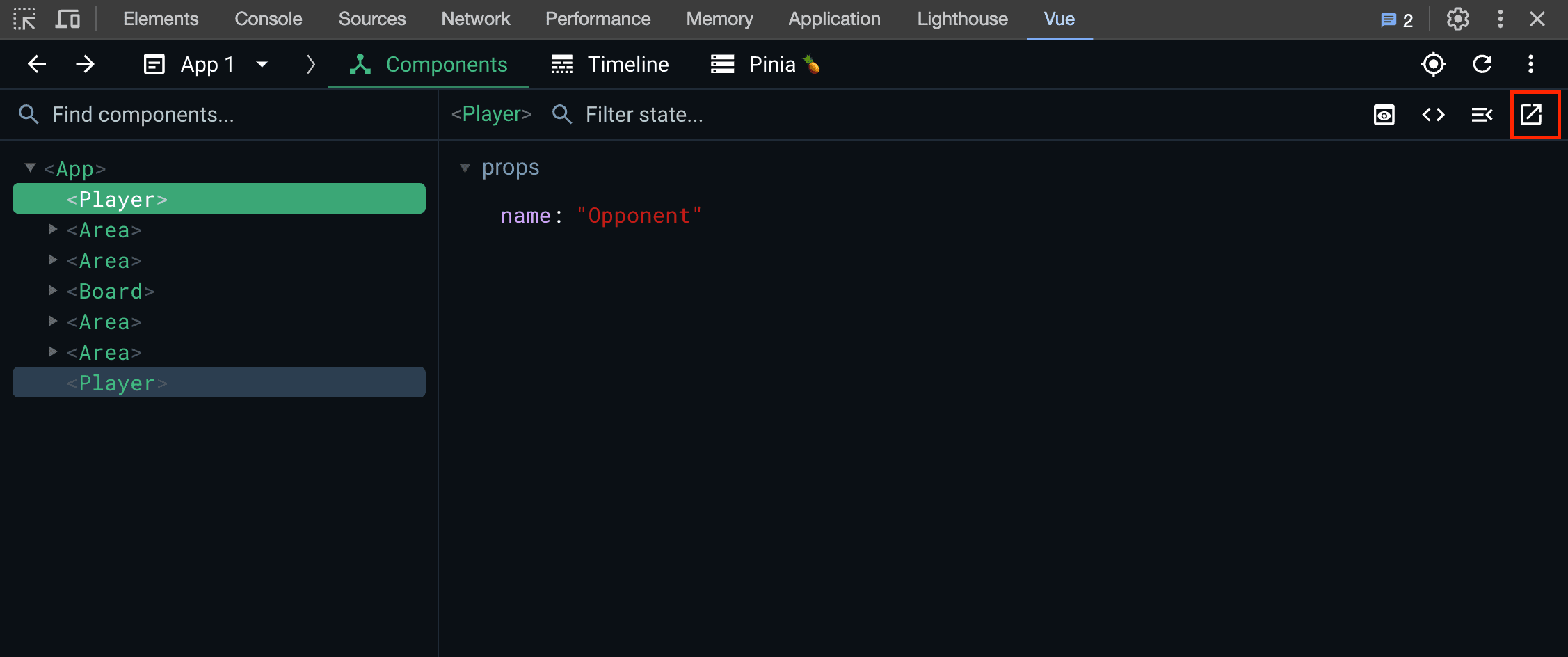
And the execution of this function uses eval:
export function openInEditor(file) {
  // Console display
  const fileName = file.replace(/\\/g, '\\\\');
  const src = `fetch('${SharedData.openInEditorHost}__open-in-editor?file=${encodeURI(
    file
  )}').then(response => {
    if (response.ok) {
      console.log('File ${fileName} opened in editor')
    } else {
      const msg = 'Opening component ${fileName} failed'
      const target = typeof window !== 'undefined' ? window : typeof global !== 'undefined' ? global : {}
      if (target.__VUE_DEVTOOLS_TOAST__) {
        target.__VUE_DEVTOOLS_TOAST__(msg, 'error')
      } else {
        console.log('%c' + msg, 'color:red')
      }
      console.log('Check the setup of your project, see https://devtools.vuejs.org/guide/open-in-editor.html')
    }
  })`;
  if (isChrome) {
    target.chrome.devtools.inspectedWindow.eval(src);
  } else {
    // eslint-disable-next-line no-eval
    eval(src); // <---
  }
}
Briefly analyze this code:
- Handle backslashes to ensure filename is correct path
- Send a GET Request to
{your_localhost}/_open-in-editor?file=/path/to/xxx.vue, this request will call the launch-editor package to open editing and corresponding files.- For more details, refer to How is Vue Devtools' "Open component in editor" function implemented?
- Log success or failure message in Browser Console
Steps 2. and 3. are wrapped in a string and then executed using eval.
The reason for using eval here is to execute the same code in different environments, so store this JS code with string first, and then decide to use native eval or chrome.devtools.inspectedWindow.eval provided by Chrome API according to the environment (Chrome or not Chrome).
4. Angular i18n
This is when Angular previously handled numeric symbols and currency symbols for i18n, executing via eval(content.toString()) allows the variables in the passed content to be declared and accessed.
function extractNumberSymbols(content, localeInfo, currencySymbols) {
  //eval script in the current context so that we get access to all the symbols
  // eslint-disable-next-line no-eval
  eval(content.toString());
  for (var propName in goog.i18n) {
    var localeID = findLocaleId(propName, 'num');
    if (localeID) {
      var info = getInfoForLocale(localeInfo, localeID);
      info.NUMBER_FORMATS = converter.convertNumberData(goog.i18n[propName], currencySymbols);
    }
  }
}
Because explain fully is complicated, I will stop here. Check Source Code for the rest!
When you don't trust the script eval is executing
In JavaScript itself and different execution environments (Node.js and browser), there are corresponding solutions, but mostly they are isolated from the original execution environment.
1. JavaScript: ShadowRealm (Proposal)
ShadowRealm is a unique global environment with its own global object containing its own intrinsics and built-ins (standard objects unbound to global variables, like the initial value of Object.prototype).
It is expected to solve security issues that may be caused by methods such as eval and new Function in JavaScript, preventing untrusted code from accessing internal variables or resources of the main application, providing a safer code isolation mechanism.
Since ShadowRealm is currently in the proposal stage and has not been fully implemented by all browsers, I will stop here. Those interested can delve deeper.
2. Browser: iframe + sandbox + srcdoc
Build an <iframe> with sandbox attribute, and use srcdoc attribute to embed the JS Code you want to execute.
The sandbox attribute imposes many restrictions on the iframe, such as prohibiting form submission, prohibiting sending APIs, etc. It can be used to isolate untrusted code.
- But note that when
allow-scriptsandallow-same-originare used together, the iframe can run scripts and access parent DOM, and even cause attributes under sandbox to be reset, losing original function.
<body>
  <button id="runCodeButton">Execute Untrusted Code</button>
  <div id="output"></div>

  <script>
    document.getElementById('runCodeButton').addEventListener('click', () => {
      const untrustedCode = `
        let ytInitialData = {
          header: {
            c4TabbedHeaderRenderer: {
              title: 'YouTuber Name',
              subscriberCountText: {
                simpleText: 'xxx subscribers',
              },
            },
          },
        };
        ytInitialData;
      `;

      const iframe = document.createElement('iframe');

      // Use sandbox attribute to isolate code
      iframe.sandbox = 'allow-scripts'
      // Use srcdoc attribute to set code to run
      iframe.srcdoc = `
        <script>
          ${untrustedCode}
          top.postMessage({data: ytInitialData}, '*');
        <\/script>
      `;

      onmessage = () => (event) => {
        console.log('message received');
        console.log(event.data); // Get data!
      });

      iframe.style.display = 'none';

      // Add iframe to document
      document.body.appendChild(iframe);
    });
  </script>
</body>
3. Node.js: isolated-vm
Through the isolated-vm package, you can execute JavaScript code in an independent virtual machine isolated from the main thread, so that untrusted code will run in a restricted environment and will not affect the original code.
Conclusion
When I first wrote this article, it actually only included the first two usage scenarios, and adopted an extremely negative attitude towards the use of eval. But actually, after searching carefully, there are quite a few usage scenarios. As long as you grasp the concepts and analyze the current situation, you can use it. The basis for judging eval is "Do you trust the script you execute", and avoid performance issues mentioned in Never use eval()!.
Such a shift was mainly due to receiving use cases of Vue devtools and Angular provided by Huli (Original Tweet) and suggestions from flandre after sharing on Twitter. What was originally a random note thought to be nothing unexpectedly extended a lot of interesting knowledge, and I am very grateful along the same time!
Also, I came into contact with eval this time on ChatGPT, feeling deeply that ChatGPT can indeed expand my knowledge boundary of "Unknown Unknown", but after expansion, it still needs to be understood. Because although the solution provided can meet the needs, it may not consider so much, nor necessarily provide the best solution for current situation. Like this time it provided eval solution, but actually safer JSON.parse() solution can be used. After delving deeper, discovered eval can actually be applied in dev tools and development tools, which is a completely unexpected connection.
In a word, usually expand your own knowledge to increase judgment on this information!
If anyone wants to supplement or knows other usage scenarios of eval, welcome to leave a message to tell me 🤩!