
- Published
Talk about Web Fonts — Design, File Formats and Frontend Loading
目錄
Note: This post is translated by AI. If you find any unnatural phrasing or errors, please feel free to contact me via email or other channels. Your feedback is appreciated!
A while ago, the font bundle from Design Not Deep caused a wave of font claiming craze. Besides slides, posters, and social media posts, have you ever thought about how fonts are used on web pages?

photo by David Klein on Unsplash
A while ago, the font bundle from Design Not Deep caused a wave of font claiming craze. Besides slides, posters, and social media posts, have you ever thought about how fonts are used on web pages?
So today I will share some knowledge and technical details about using fonts on web pages. The first half is general knowledge, and the second half talks more about technical details of how web pages use fonts. If you are not a frontend engineer, read at your own discretion!
Through this article, I will tell you 👇
- Birth of a font (Unprofessional version)
- What are font files
- How web pages use fonts
Font Design Process
Before starting the introduction, because I was really curious about how fonts are designed, I asked a designer friend some questions about font design. Here is a brief introduction to the process.
For Traditional Chinese, several fixed characters will be made first. These characters can roughly cover the stroke rules of Chinese characters, such as "永" includes all different strokes, and "鷹" can check the situation with many horizontal strokes, etc.

https://www.easyatm.com.tw/wiki/%E6%B0%B8%E5%AD%97%E5%85%AB%E6%B3%95
Then softwares like Glyphs or FontForge might be used to adjust various details. After making most Chinese characters, they are put together to check consistency. Finally, it's a sprint to finish the remaining characters.
How many Traditional Chinese characters need to be designed for web pages?
Regarding the total number of Chinese characters, the Ministry of Education's Dictionary of Chinese Character Variants contains more than 100,000 characters. According to the Noto Sans TC files provided by Google Font, the number of characters that need to be loaded on web pages is about 15,000.
After the unprofessional introduction to the general process, I will not mislead people with design details here. Those interested can go to justfont blog to see more good articles about fonts.
In what file formats are fonts generally stored?
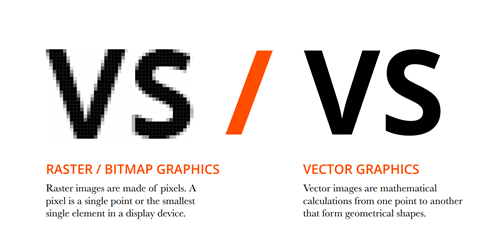
Initially, computer text was presented as bitmaps. There was still a big gap between this stage and printed text, so even if the font was designed, it was difficult to fully present its beauty on the computer.
But after Adobe introduced PostScript in 1984, computers began to be able to display vector versions of text, with effects even comparable to printed text, thus opening up the possibility of applying various fonts on computers.
Difference between bitmap and vector image 👇
https://digitalmediaandvisualarts.blogspot.com/2016/10/raster-vs-vector.html
Then major software giants competed to develop font formats. Those interested in history can verify Format War: The font file you use is the product of the war between giants. Here I will introduce these seven font file formats after the war one by one. Except for ttc, they are all fonts that can be loaded by web pages.
1. .ttf (TrueType Font)
- In 1989, because Adobe was unwilling to publish PostScript's trade secrets, Apple and MicroSoft cooperated to develop a new font format TrueType (.ttf).
- It is the earliest and most widely used format. Most fonts downloaded on the Internet are in ttf format.
2. .otf (OpenType Font)
- In 1997, MicroSoft and Adobe developed OpenType (.otf), which is an extension of TrueType and also supports Unicode.
- In 2005, it was incorporated into the ISO standard, called Open Font Format (off).
3. .ttc (TrueType Collection)
- Released in 1989, it is a collection of TTF or .OTF, mainly to integrate files of the same font type. For example, the Noto series can be packed into a ttc file to reduce file size.
- Web pages cannot load it directly, you can only load a certain ttf or otf file inside it individually.
4. .eot
- People who have dealt with fonts for a long time may have seen this format. It is the format mainly used by IE, but it is also going into history with IE.
5. .woff (Web Open Font Format)
- In 2010, the Web Open Font Format developed jointly by Mozilla, Type Supply, LettError and other organizations.
- woff format font files are compressed. Compared to ttf and otf, they can significantly reduce the burden of browsers loading fonts and speed up loading.
- One of the mainstream web fonts currently.
6. .woff2
- woff 2.0, mainly compressed more thoroughly. The same font can be about 20% to 30% smaller than woff.
- In current development, you can prioritize using woff2 format and handle it according to support.
7. .svg (Scalable Vector Graphics)
- A major evolution of computers in fonts was evolving from bitmaps to vector graphics, so fonts can certainly be represented in pure vector graphic formats.
- The main application of svg is in icon font, used to reduce image usage rate, and also allow icons to resize, change weight and color like text.
How to load fonts on web pages?
When loading fonts on web pages, they are mainly loaded as CSS resources using the font-face property.
font-face
Import external font files and customize related CSS properties.
Here I will use the MDN example directly to explain the basic syntax to everyone 👇
Actual use looks something like this 👇
After getting some feeling about using font-face, let's explain in detail how we can use it 👇
font-family
Define the name of font-face. It doesn't have to be the same as the original font file. Later in font-family, you only need to use this name to use the whole set of font-face properties.
Wait, font-family inside font-face can connect fallback fonts through comma, and fonts will be used in order.
src
Use url to specify the external font file path to load, local to use local font.
The example below will first use the Helvetica Neue Bold font in the user's computer. When neither of the two Local fonts are available, it will additionally download the MgOpenModernaBold.ttf font.
@font-face {
  font-family: MyHelvetica;
  src: local('Helvetica Neue Bold'), local('HelveticaNeue-Bold'), url(MgOpenModernaBold.ttf);
  font-weight: bold;
}
Not only can load multiple fonts, but can also use format to load multiple font formats to handle browser support issues.
@font-face {
  font-family: 'MyWebFont';
  src: url('myfont.woff2') format('woff2'), url('myfont.woff') format('woff');
}
unicode-range
Allows the browser to download fonts based on the given Unicode range.
unicode mentioned above means "Universal Code". The appearance of Unicode, as the name implies, is to solve the problem that text data formats of various countries are inconsistent and cannot be displayed normally. It basically defines a code for all texts so that different languages and platforms can display text normally through unicode.
- You can verify the actual conversion result in Unicode Encoding Conversion Tool!
When using it, we mainly want to achieve the following two effects 👇
- Download only the part needed on the current page to reduce load size and speed up loading.
- Create composite fonts, where a word or a sentence may contain multiple fonts.
Borrowing the example written by GTW to explain:
/* Fallback font - Size: 4.5MB */
@font-face {
  font-family: DroidSans;
  src: url(DroidSansFallback.woff); /* No unicode range specified, covers all ranges by default */
}

/* Japanese - Size: 1.2MB */
@font-face {
  font-family: DroidSans;
  src: url(DroidSansJapanese.woff);
  unicode-range: U+3000-9FFF, U+ff??;
}

/* English fonts and some symbols etc. - Size: 190KB */
@font-face {
  font-family: DroidSans;
  src: url(DroidSans.woff);
  unicode-range: U+000-5FF, U+1e00-1fff, U+2000-2300;
}
font-display
Mainly specifying the strategy of how to display and replace fonts when the web page is blocked during font loading. Usually hope to reduce web page blocking time to optimize performance.
The following strategies are available 👇
auto
Follow browser's default value, usually block.
block
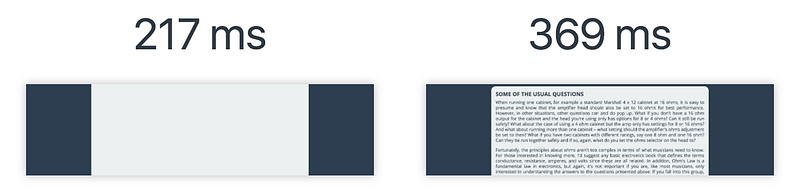
Text is hidden temporarily before the font finishes loading, and replaced immediately after loading finishes.
But actually during this period, the browser will load an invisible placeholder to occupy the space (visually it will be blank). Wait until the font finishes loading and then immediately replace the placeholder. This effect also has a proper noun FOIT (flash of Invisible Text), referring to invisible text flashing by.
https://www.w3cplus.com/css/font-display-masses.html
swap
Before the font finishes loading, the browser will use fallback font to display text (fallback font is defined in font-family). When font loading finishes, it will be replaced immediately.
This effect's proper noun is FOUT (flash of Unstyled Text). Compared to FOIT, it refers to text without customized style flashing by. Basically swap which ensures normal display is very useful in most cases.

https://www.w3cplus.com/css/font-display-masses.html
fallback
Between auto and swap, checks for a very short period (about 100ms) to hide text. If font is not loaded yet, it will display fallback font first. After font is loaded, it will be replaced.
optional
Handling upon loading is same as fallback, but browser will judge by itself whether to use custom font. If browser judges loading speed is too slow, it will directly discard custom font.
I won't elaborate on other common and simple font properties here. You can refer to MDN — font for very complete examples!
Actually I wanted to continue introducing Google Font open source fonts and some difficulties of Traditional Chinese fonts in current web usage, but I feel today's length is enough, so I will leave it for the next article!
If there are any problems, suggestions or discussions about today's content, welcome to leave a message to tell me!
Finally, if you like it, welcome to clap for me. You can clap up to 50 times. Just clap according to how helpful you think it is. This can also be a basis for me to adjust 🙌
References
- https://blog.justfont.com/2017/07/opentype-wars/
- https://www.mindscmyk.com/2021/02/26/Topic Knowledge | Three common fonts: ttf-otf-ttc-extension difference?
- https://developer.mozilla.org/zh-TW/docs/Web/Guide/WOFF
- https://www.twblogs.net/a/5d3f76babd9eee5174229d3f
- https://tools.wingzero.tw/article/sn/91
- https://css-tricks.com/snippets/css/using-font-face/
- https://www.w3cplus.com/css/font-display-masses.html